Labor planning software — in the Excel you already have

Know your shift is covered before it starts.

PULSE turns your volume forecast and roster into a clear go/no-go staffing verdict — then, after the shift, explains exactly why you hit or missed (volume vs. productivity) on a one-page report you can forward to leadership.

Plain ExcelMacro-freeOne-time purchaseWorks offline
The daily loop — every shift
  1. 1
    Set up onceWage, throughput, roster, thresholds
  2. 2
    Plan the shift → verdictCovered or short, before it starts
  3. 3
    Run the shiftTrack headcount: start → mid → end
  4. 4
    Enter actualsOne place, once
  5. 5
    The report writes itselfPlan vs. actual — and why you missed
Repeat every shift

Your spreadsheet can't answer the two questions that matter.

Most floor managers plan labor in a sheet that shows numbers but can't tell them whether they're actually covered — and after a rough shift, can't say whether the miss was volume or productivity. So you find out you're short mid-shift, and you defend the plan from memory.

“Am I covered?”

Scheduled headcount isn't the same as who'll show — or what the work actually needs.

“Why did we miss?”

One variance number can't separate light volume from a slow shift. So you fix the wrong thing.

“Can I defend this?”

You rebuild a summary by hand for every stand-up, and narrate the story from memory.

How it works — Basic is the flagship

One clean loop, every shift.

01 · Set up once

Your numbers

Wage, throughput, attendance, thresholds. Nothing hardcoded — PULSE adapts to your operation.

02 · Plan the shift

Get the verdict

Enter today's forecast and roster; PULSE returns a go/no-go verdict with the exact headroom.

03 · Run the shift

Track headcount

Update start / mid / end headcount as the shift changes.

04 · Enter actuals

One place, once

Type end-of-shift actuals in a single spot. Every report reads from it.

05 · Review & export

The report writes itself

PULSE builds the one-page report — why you hit or missed, and the cost. Add your note, export.

Start here. Switch on more when you're ready — same file, no upgrade to buy.

Not a template. A decision.

The verdict

A go/no-go call, not just numbers

PULSE compares who'll actually show (your roster × attendance) against what the work needs (volume ÷ rate) and gives you a clear COVERED or SHORT — with the exact headroom, before the shift starts.
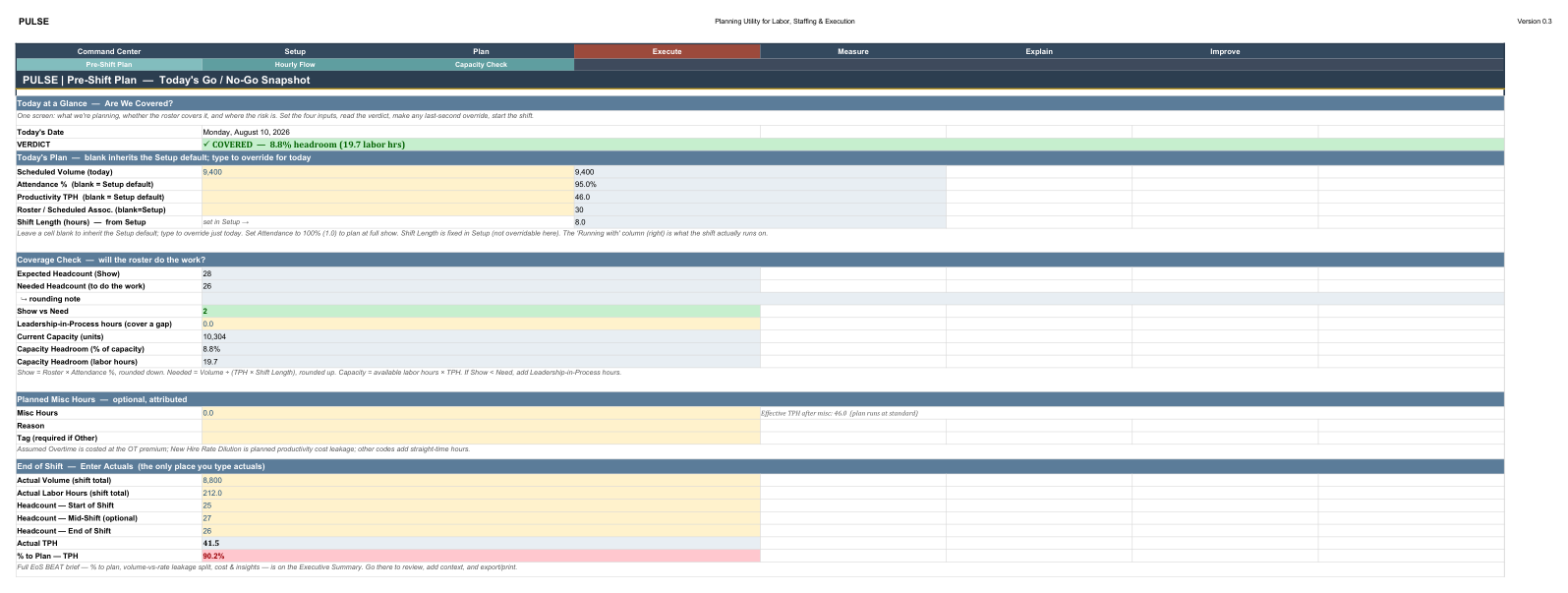
Pre-Shift Plan showing a COVERED verdict with 8.8% headroom

The explanation

Know why you missed — volume or productivity

After the shift, PULSE splits every miss into volume-driven vs. rate-driven, and the dollars behind each. In this example a 20.7-hour miss breaks down into 13.0 from light volume and 7.7 from rate — $519 of cost leakage, attributed automatically. Stop guessing; fix the right thing.
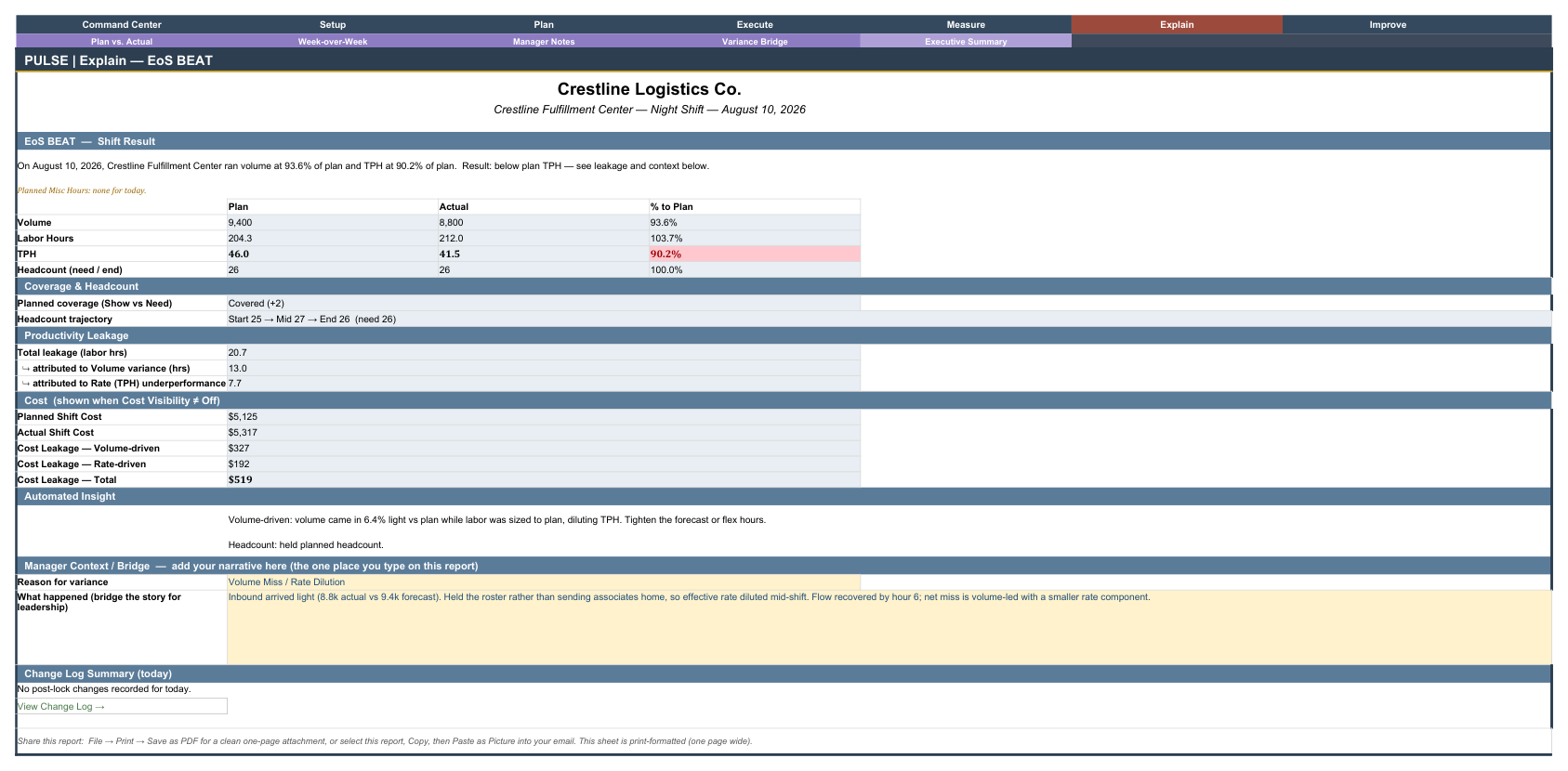
Executive Summary EoS BEAT report with the volume-vs-rate leakage split

The report

One page you can actually defend

Plan vs. actual, %-to-plan, leakage, and your own narrative — on a single print-ready page you forward to leadership in seconds. The number and the story, together.
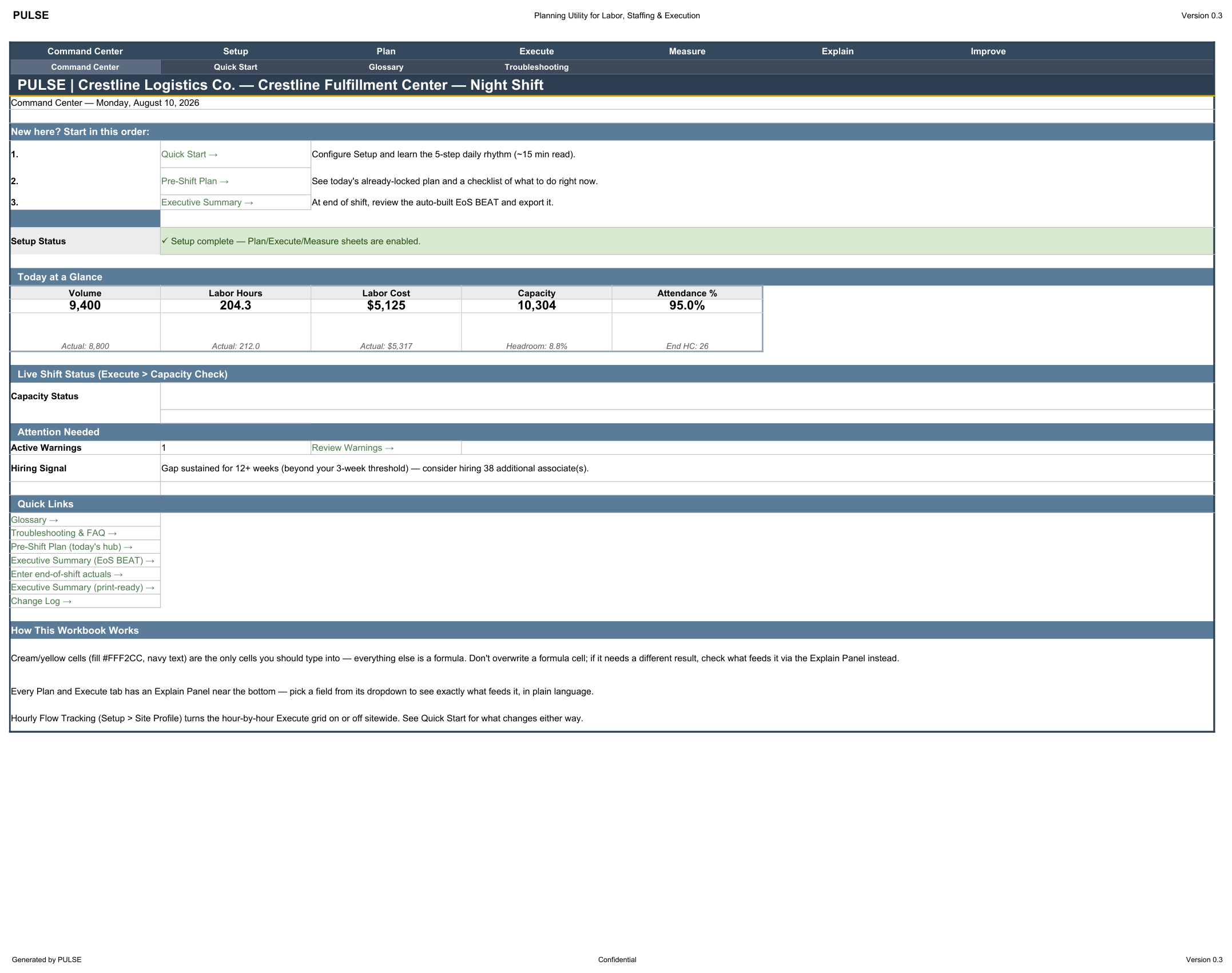
PULSE Command Center dashboard with today-at-a-glance tiles

Grows with you — a learning curve, not a paywall

Master one level. Unlock the next.

Every copy of PULSE is the full engine. You start in Basic and grow into the rest at your own pace — when the daily loop is second nature, switch on the next level with the included Morph Guide. One price. Nothing missing.

1
Start here

Basic

Ships on by default

Master the daily loop: set up once, get a go/no-go verdict on Pre-Shift, and review the one-page end-of-shift report. Eight usable tabs plus a short Unlock More guide — nothing else to distract you.

2
Unlock next

Horizon

Feature flag: Horizon Planning

Once the daily loop is second nature, switch on the forward view: 7-day and 12-week staffing outlook, plus hiring signals when a gap is real.

3
Then

Next Day

Feature flag: Next Day Plan

Add a forward next-day planning cadence with a lock and shift handoff — and PULSE begins building multi-day history and trends.

4
Mastery

Full

Hourly Flow + all analysis

The complete system: hour-by-hour tracking with live capacity, and the deep Measure / Explain / Improve sheets — variance bridge, week-over-week, trends.

Each level is already in your file — turning it on is a documented, ten-second step (PULSE is macro-free, so it's safe in any environment).

One product, three cadences

How an operations manager actually runs it.

The same engine works at three rhythms — the daily shift loop you run every shift, next-day planning a day ahead, and a weekly horizon for hiring. All included in one file; switch on the cadences you need.

Basic — Daily Shift Loop

Every shift · BEAT
Once

Set up

Wage, throughput, roster & thresholds in Input Manager

01

Plan the shift

Enter today's volume & roster on Pre-Shift Plan

02

Go / No-Go

COVERED or SHORT, with exact headroom

03

Run the shift

Track start / mid / end headcount

04

Enter actuals

One place, once, end of shift

05

Executive Summary

EoS BEAT: plan vs actual + leakage — note & export

Cadence: Setup is done once; steps 01–05 are the daily rhythm you repeat every shift.

Next Day Plan

Daily · one day ahead
01

Day before

Draft tomorrow's plan on Next Day Plan

02

Lock it

Finalize the plan you commit to

03

Next day

Run the shift & enter actuals

04

Measure vs. plan

Plan vs. Actual + Variance Bridge explain any gap

05

Executive Summary

Feeds the same one-page report

Cadence: Same daily rhythm — but you plan a day ahead and measure against a plan you committed to.

Horizon & Hiring

Weekly · once a week
01

Weekly review

D+7 look-ahead + 12-week volume/capacity outlook

02

Spot the gap

A sustained capacity shortfall surfaces

03

Hiring Plan

Turns the gap into a hire recommendation

04

Signals & risks

Hiring Signals + Future Risks flag what's coming

05

Act ahead

Adjust roster / start hiring before the crunch

Cadence: A separate weekly cadence — run about once a week, not every shift.

Built for operations that run on throughput.

Warehouse, fulfillment, distribution, and back-of-house teams that plan labor against volume — and can't justify (or wait for) enterprise workforce software. If you plan a shift in Excel today, PULSE replaces the guesswork.

One price. The whole system.

PULSE

$149 $99 one-time · founding price
  • The full PULSE engine — ships as a clean Basic daily loop, grows to the complete system (every level included, one price)
  • A pre-filled demo workbook so you see a completed plan and report
  • Seven guides — Quick Start, Morph, Glossary, Sheet-by-Sheet, Reporting, Flowcharts, Troubleshooting
  • Functionality matrix + single-organization license · free updates within the version
  • Macro-free · works offline · no subscription · your data never leaves your computer
Checkout opening soon soon

Launching  PULSE is in final launch prep. Checkout & instant download go live shortly.

Instant download. Plain Excel file. Limited refund policy — if it doesn't work as described, contact us within 14 days.

Questions

Is this just a spreadsheet template?

No. It's a decision-support system delivered in Excel. A template shows numbers; PULSE makes a go/no-go coverage call and automatically attributes any miss to volume or productivity — with the dollars behind each.

Do I need to install anything or subscribe?

No. It's a one-time purchase — a plain .xlsx file. No subscription, no login, no cloud, no add-ins. Your data never leaves your computer.

Will it work in my Excel? Does it use macros?

It works in Excel 2021, Microsoft 365, and Office LTSC. It's macro-free by design, so it runs in locked-down corporate environments where macros are disabled.

It only shows 8 tabs — where's everything else?

That's Basic, the streamlined starting point: eight usable tabs plus a short Unlock More guide tab. The full engine is already in your file. When you're ready, Unlock More (and the included Morph Guide) walk you through switching on Horizon, Next Day, and Full — no new purchase.

Why can't a setting turn those tabs on automatically?

Because PULSE is macro-free (so it's safe anywhere). A formula can't show or hide a tab without macros — so unhiding is a quick, documented manual step. It takes about ten seconds.

Can you customize it or connect it to my systems?

Every assumption is configurable to your numbers, but custom formulas, integrations, and bespoke changes aren't included — PULSE is an evergreen product, not a custom-build service.

Walk into the shift knowing you're covered.

Walk out with the report already written.

Get PULSE soon